

Crime on the internet has increased significantly over the years. It is important today to protect your online accounts more than ever. But the problem is this, how do I select a strong password and remember them all? The old days of simply remembering your password or writing them down is long, long gone. Password managers (PWM) are here to help.
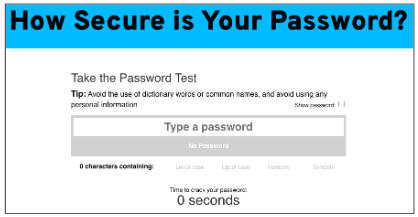
Just how secure is my password? Try testing any of your existing passwords here to see how long it would take to crack your password. Click on the image (passwordmonster.com).
STRENGTHEN YOUR PASSWORDS WITH THREE SIMPLE TIPS (CISA). From the US Gov Cybersecurity & Infrastructure Security Agency:
- Make Them Long: at least 16 characters – longer is stronger.
- Make Them Random: use a random string of mixed-case letters, numbers and symbols (e.g. Yuc8$RikA34%ZoPPao98t). Another option is to create a memorable phrase of 4-7 unrelated words (e.g HorsePurpleHatRunBay).
- Make Then Unique: use different strong password for each account.
It isn’t a simple task to use strong passwords…that’s where PWMs come into play. There are many PWMs out there. Google ranked #1 with 32% market share, Apple #2 and 23% and LastPass #3 at 11% (Source: Security.org). Here are some of the popular PWMs in 2024.
While they offer similar features, each vendor has its own strengths and weaknesses. Apple and Google are free and integrated into their browsers. Others have some “free plans” and most have a regular monthly subscription model. Generally, this technology is safe and secure but remain vigilant at all times.
What are the benefits of using a password manager (Source: Cyber)?
- Encryption: encrypts your passwords so no one but you can see them.
- Saves Time: as you log into your accounts automatically or with just one click.
- Strong Passwords: they create unique and strong passwords for all your accounts.
- Multiple Devices: depending on the vendor, most PWMs work on different devices from your computer, tablet or smartphone with minimal effort.
Remember though, not all PWMs are 100% safe. Some are better than others. You have to do your research and select a vendor you trust.
Dave’s Garage YouTube channel is a very popular tech channel. This episode is probably the best video I’ve seen about PWM and also recommends Chrome as your PWM and the reasons why.
TIPS ON USING A PASSWORD MANAGER my advice when you start to use a PWM and other best practices.
- Watch Videos on how to setup your PWM.
- Go Into Your PWM Dashboard on a Regular Basis to review your password status and take action on any passwords that are identified as a risk.
- Do Not Ignore Password Notifications as these are often new risks recently discovered about your password use that may include compromised and hacked accounts.
- Be Careful and Follow Autofill Prompts to make sure you are saving the right password. Sometimes I change a password and when the PWM prompts to save, I accidentally select “Cancel”. This requires me to change the password again and re-save back into the PWM.
- Use “Sign in with Google”, or Apple/etc, to sign into websites as long as they are reputable. This saves time.
- Turn On 2 Factor Authentication on all your accounts.
- Enable Screen Lock on Desktop/Laptop to limit unauthorized access.
- Disconnect Accounts from All Devices if you lose a device. This will force an authentication to unlock the device.
- Avoid Logging Into Accounts from Public Computers as these maybe compromised with malware/key loggers. Only use reputable public computers only when necessary.
SOME VIDEOS TO GET YOU STARTED WITH PASSWORD MANAGERS ON THE MORE POPULAR BROWERS
Here is a generic video by HelpCloud which gives you an intro to using PWMs in native browsers including Chrome/Safari/Firefox/Edge.

SOCIAL LOGINS have you ever been to a site and you are presented an option to login using your Apple or Google? These are called Social Logins. These are generally very safe and eliminates passwords but make sure you use this for only reputable sites.
Some of the pros and cons are (Source: Beyond Identity). Advantages: 1) Improved User Experience, 2) Mobile Friendly, 3) Increased Data Collection, 4) Reduced Cart Abandonment. Disadvantages: 1) Lack of Trust and Consumer Privacy Concerns by Consumers, 2) Mandatory Data Sharing, 3) Blockage of Social Networks, 4) Visitors Forget Which Social Login Used, 5) Too Many Options, 6) Security issues. While I cannot go into detail, I suggest you go to the source for a detailed description of the above points.
THE BEGINNING OF THE END OF PASSWORDS? Some of the largest tech companies like Google, Apple and Microsoft are leading they way by offering passkey support. Passkeys are digital credentials which lets users sign into accounts without the requirement of a username or password.
Passkeys are automatically generated, are more secure and thus do not require the use of usernames/passwords/etc. These passkeys are unique and shared across devices so are resilient to being cracked by attackers.
Passkeys are implemented similarly by the tech companies. A good overview is the following article from Google about this topic. “The simplest, most secure way to sign in to your accounts without a password“.

